
Subscribe / mute calendars
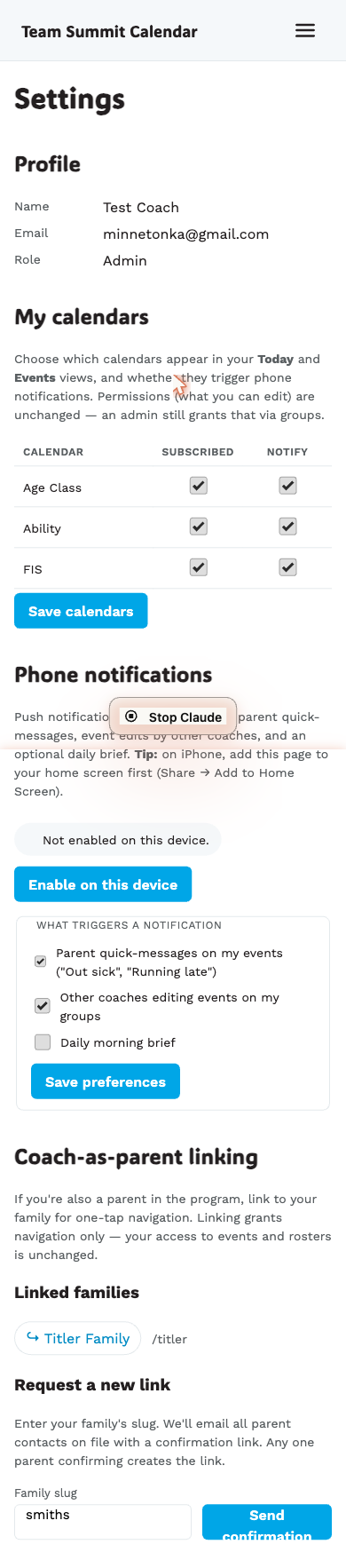
Each coach can decide, per calendar, two things:
- Subscribed — whether the calendar’s events appear in their default Today + Events views.
- Notify — whether the calendar’s events trigger phone push.
Settings live in /coach/settings → My calendars.
Default behavior
When you first sign in, you’re subscribed and notify-on for every calendar in the club. You only ever opt out, not opt in.
Examples
| Goal | What to do |
|---|---|
| Stop seeing FIS events on Today | Uncheck Subscribed for FIS. |
| See FIS events but no FIS pushes | Keep Subscribed on, uncheck Notify for FIS. |
| Quiet weekend — pause all pushes for one calendar | Uncheck Notify for that calendar; turn back on Monday. |
What this does NOT change
Calendar subscriptions are a soft filter. Your underlying permissions are unchanged:
- You can still open any event you have group access to via a direct URL or a push notification deep-link.
- You can still edit events even from unsubscribed calendars.
- Admins still control your group access via
/coach/coaches(admin page).
How it affects each view
- /coach/today — silently drops events whose calendar isn’t subscribed.
- /coach/events — defaults to filtering by subscribed calendars. A “Showing your subscribed calendars · show all” chip lets you bypass for one-off browsing.
- Phone push — quick-msg and event-edit pushes skip events in calendars where Notify is off.
- Daily brief — only lists events from subscribed calendars.
Saving
Toggle the boxes and tap Save calendars. The “Notify” column auto-disables when you uncheck Subscribed (unsubscribed calendars can’t notify).