
Working offline
The coach app is designed for chairlifts. When your phone loses signal, the Today view keeps functioning:
- Reading today’s events, roster, coach notes — all in memory.
- Marking attendance — your taps queue locally and sync when you’re back online.
- Coach notes & channel posts — these require a network connection (they fan out to other families). You’ll see a friendly error and can retry.
What you’ll see when offline
A yellow bar slides in at the top of /coach/today:
● Offline — you can mark attendance; saves will sync when you're back online.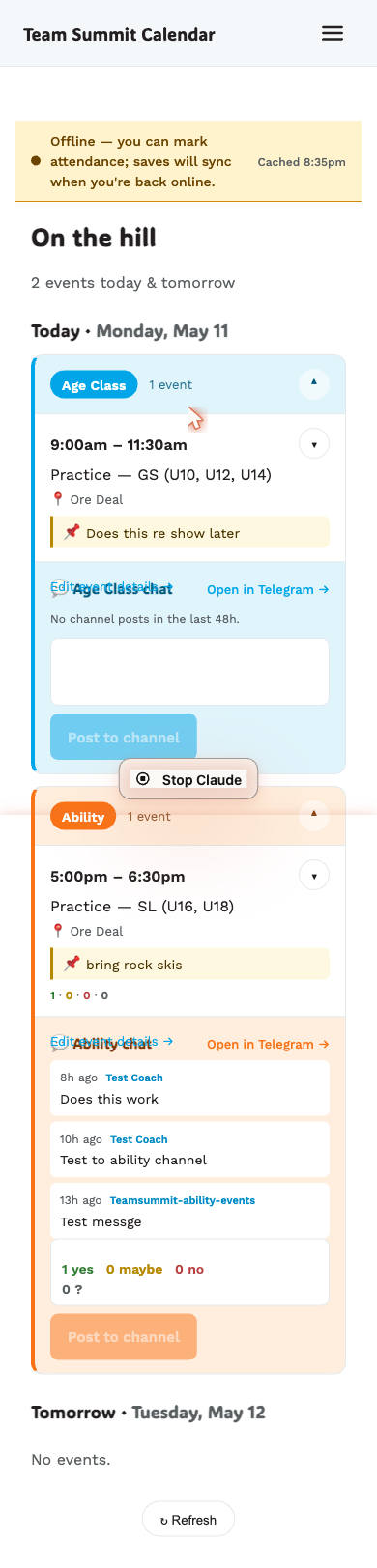
Per-event, a ↻ N pending chip shows how many of your attendance taps
are queued waiting to upload.
When you’re back online, the bar flips blue:
● Syncing 2 attendance changes……and disappears once everything has flushed. You’ll see a brief refresh to pull the latest state from the server.
What survives a cold reload
You can close the app and re-open it while offline. The PWA service worker serves the page shell it cached the last time you were online, which is what you see — roster and all.
You cannot sign in fresh while offline — magic links need a network trip. Once signed in on a device, you stay signed in.
What doesn’t work offline
- Posting a coach note (it fans out to families).
- Posting to the channel chat (Telegram API call).
- Marking attendance for an event you haven’t loaded yet (no roster cached).
- The desktop
/coach/eventslist (it always fetches fresh).
If you tap something that requires network while offline, you’ll get a hint naming what needs the network — “Offline — coach notes require a connection.” or “Offline — channel posts require a connection.” — and the action is not queued, because both fan out to families and we don’t want unpredictable later sends.