
The Today view
/coach/today is the view built for being on the hill. It shows
today + tomorrow’s events the coach has access to, grouped by
calendar, with one tap to expand into full details.
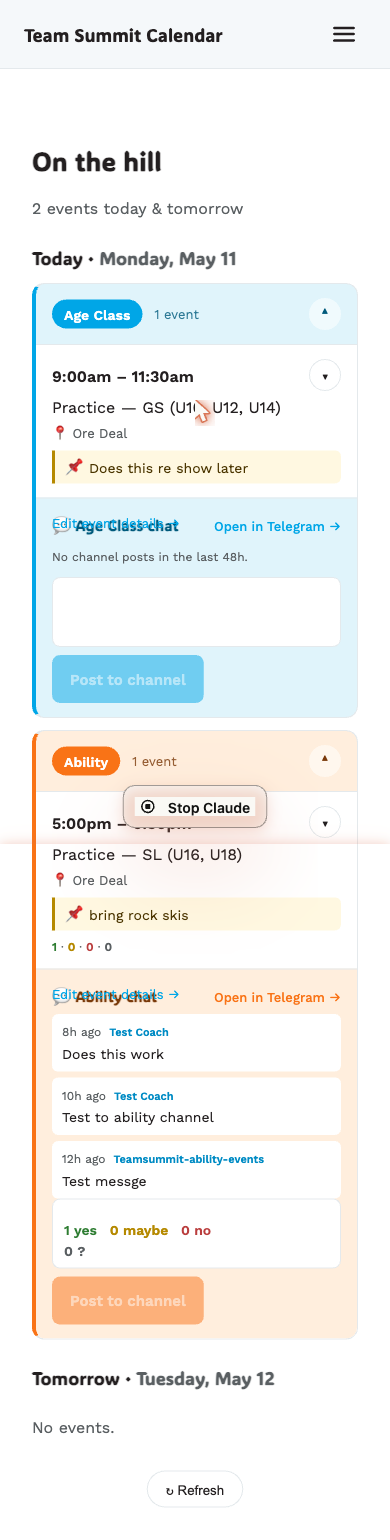
How the page is organized
On the hill3 events today & tomorrow
Today · Mon May 11  [Ability]  2 events  ▾    5:00pm  Training — GS (U16)         📍 Copper      9 · 2 · 3      📌 Bring rock skis    7:00pm  Training — SL (U16)      …    💬 Ability chat      [last 48h posts]      [Post to channel]
  [Age Class]  1 event  ▾    …
Tomorrow · Tue May 12  (collapsed by default)
Calendars get their own color so it’s obvious at a glance which one you’re looking at (Age Class · cyan, Ability · orange, FIS · violet — the order is fixed by your club’s calendar sort order).
Tapping an event
By default, each event shows:
- Time range, title, location
- The current 📌 coach note (if one’s saved)
- Attendance counts:
9 yes · 2 no · 3 ?
Tap anywhere on the row to expand. You’ll get:
- A link to Edit event details → (full form)
- Metadata: discipline, equipment, notes
- Attendance roster with the Yes / No chips, behind a Show roster ▼ disclosure inside the expanded card
- Coach-note editor (pre-filled with the current note)

Filtering by calendar
If you’ve unsubscribed from a calendar in Settings → My calendars, its events don’t appear on Today. Re-subscribe any time.
What it doesn’t show
- Events beyond tomorrow — for those use Events in the top nav on a laptop, or More → All events on a phone.
- Cancelled events that were hard-deleted.
Refreshing
The page refreshes itself when you come back to it after 30 seconds or more
away, and when your phone reconnects after being offline. There’s a manual ↻ Refresh
button at the bottom too.